

Getting Started
Using HTML Content
Using Online Resources
Getting Started
Introduction
A5WD is a library for building next generation desktop applications using Alpha Anywhere.
Built using Alpha Anywhere’s Xbasic. Fast, lightweight, and easy to use.
Download
Download the compressed file using the link below.
| Filename: | A5WD.zip |
| File Size: | 22 KB |
| Version: | 1.0.0 |
| MD5: | 793be12d8b61f5970fec2382c626b699 |
How to Use?
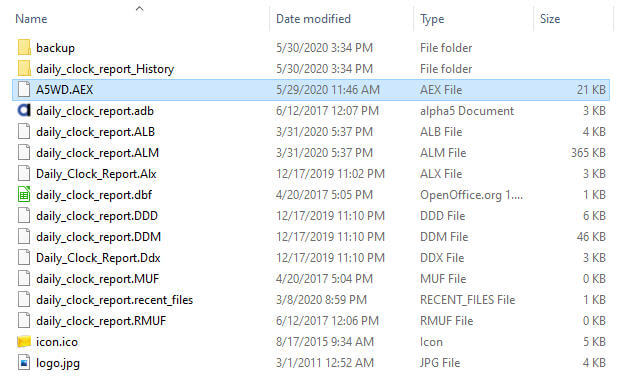
Unzip then copy the file “A5WD.AEX” to your wosrkspace.
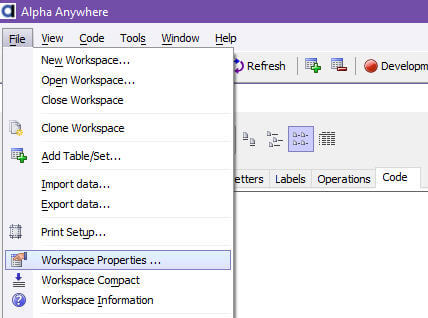
Open the workspace then click on “File” and “Workspace Properties …”.
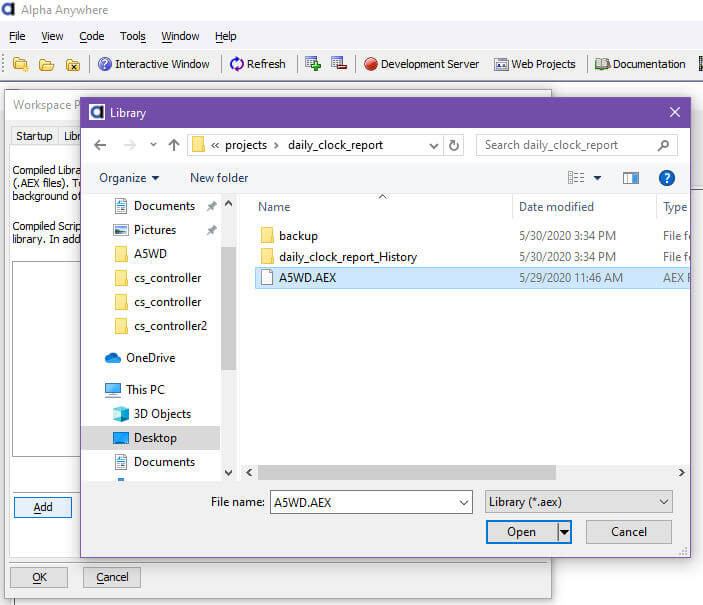
Click on the “Compiled Libraries” tab then click on “Add” button.
Navigate to your workspace. Select the A5WD.AEX file then click “Open”.
Finally, click “OK” button.
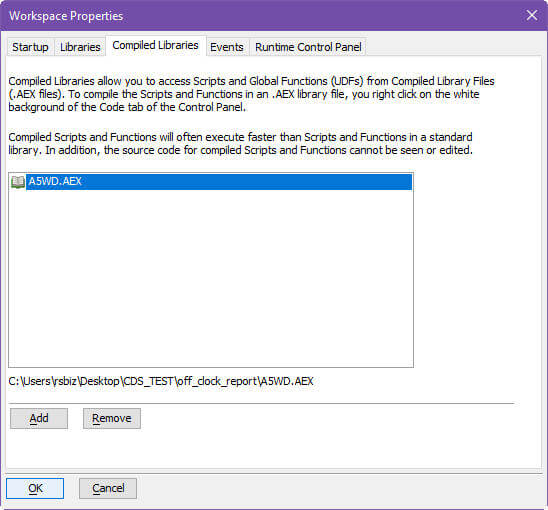
The library is now ready to be used.
Using HTML Content
Using HTML Content
Set HTML content by setting the value of cp.html.
Example
' autoexec
'
' Instantiate and set xdialog title.
dim xdsMyDialog as P = new a5wd::xdialog::modeless("My Dialog")
'
' Set HTML content.
xdsMyDialog.cp.html = <<%html%
	<style>
			div, button { margin: 20px 0 0 100px; }
	</style>

	<form>
		<div>
			<label for="first_name_fld">First Name:</label><br>
			<input type="text" id="first_name_fld">
		</div>
		<div>
			<label for="last_name_fld">Last Name:</label><br>
			<input type="text" id="last_name_fld">
		</div>
		<button type="button" onclick="xDialogEvent('submit')">Submit</button>
	</form>

	<script>
		(function() {
			document.getElementById('first_name_fld').focus();
		})();
	</script>
%html%

' Set EventCode.
xdsMyDialog.EventCode = <<%code%
	' Note: evt = a_dlg_button
	' Handle events.
	if evt = "submit"
		dim new_user as C = cp.GetValue("first_name_fld") + " " + cp.GetValue("last_name_fld")
		ui_msg_box("Xbasic", "Welcome " + new_user + ".", UI_INFORMATION_SYMBOL+UI_OK)
	end if
%code%
'
' Open the xdialog using the desired size and default position.
xdsMyDialog.Open("4", "2.4")
Using Online Resources
Using Online Resources
Load online resources such as CSS/Javascript on your HTML.
Example
Xbasic
' autoexec
'
'Instantiate and set xdialog title.
dim xdsMyDialog as P = new a5wd::xdialog::modeless("My Dialog")
'
' Set HTML content.
xdsMyDialog.cp.html = <<%html%
	<!-- load bootstrap CSS from CDN -->
	<link rel="stylesheet" href="https://stackpath.bootstrapcdn.com/bootstrap/4.5.0/css/bootstrap.min.css">

	<!-- load jquery and bootstrap from CDN -->
	<script src="https://code.jquery.com/jquery-3.5.1.slim.min.js"></script>
	<script src="https://stackpath.bootstrapcdn.com/bootstrap/4.5.0/js/bootstrap.min.js"></script>

	<div class="container-fluid">
		<form>
			<div class="form-group mt-5">
				<label for="first_name_fld">First Name</label>
				<input type="text" class="form-control" id="first_name_fld">
			</div>
			<div class="form-group">
				<label for="last_name_fld">Last Name</label>
				<input type="text" class="form-control" id="last_name_fld">
			</div>
			<button type="button" onclick="xDialogEvent('submit')" class="btn btn-primary">Submit</button>
		</form>
	</div>

	<script>
		(function() {
			$('#first_name_fld').focus();
		})();
	</script>
%html%

' Set EventCode.
xdsMyDialog.EventCode = <<%code%
	if evt = "submit"
		dim new_user as C = cp.GetValue("first_name_fld") + " " + cp.GetValue("last_name_fld")
		ui_msg_box("Xbasic", "Welcome " + new_user + ".", UI_INFORMATION_SYMBOL+UI_OK)
	end if
%code%

' Open the xdialog using the desired size and default position.
xdsMyDialog.Open("5", "3.5")